On this page
Your site ranks in Google. It is still missing from ChatGPT answers. Those two facts are compatible, and the reason is in the fetch.
Google audits ask whether your page can be rendered. An AI visibility audit asks a narrower question: what arrived in the response body, before any script ran. Everything an AI engine can say about your business comes from those bytes.
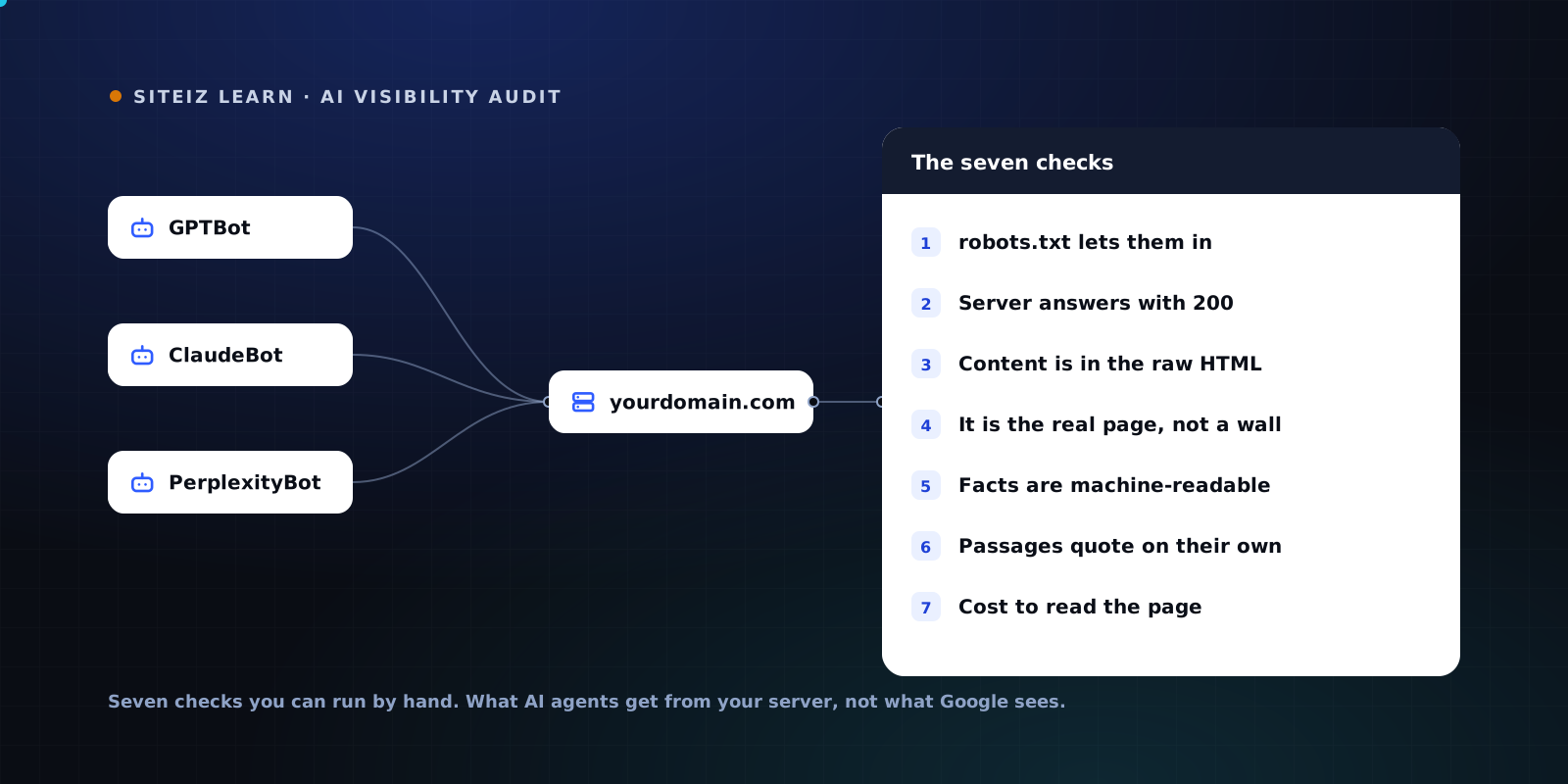
Here is the audit we run, reduced to checks you can do by hand.
Why a Google audit does not transfer
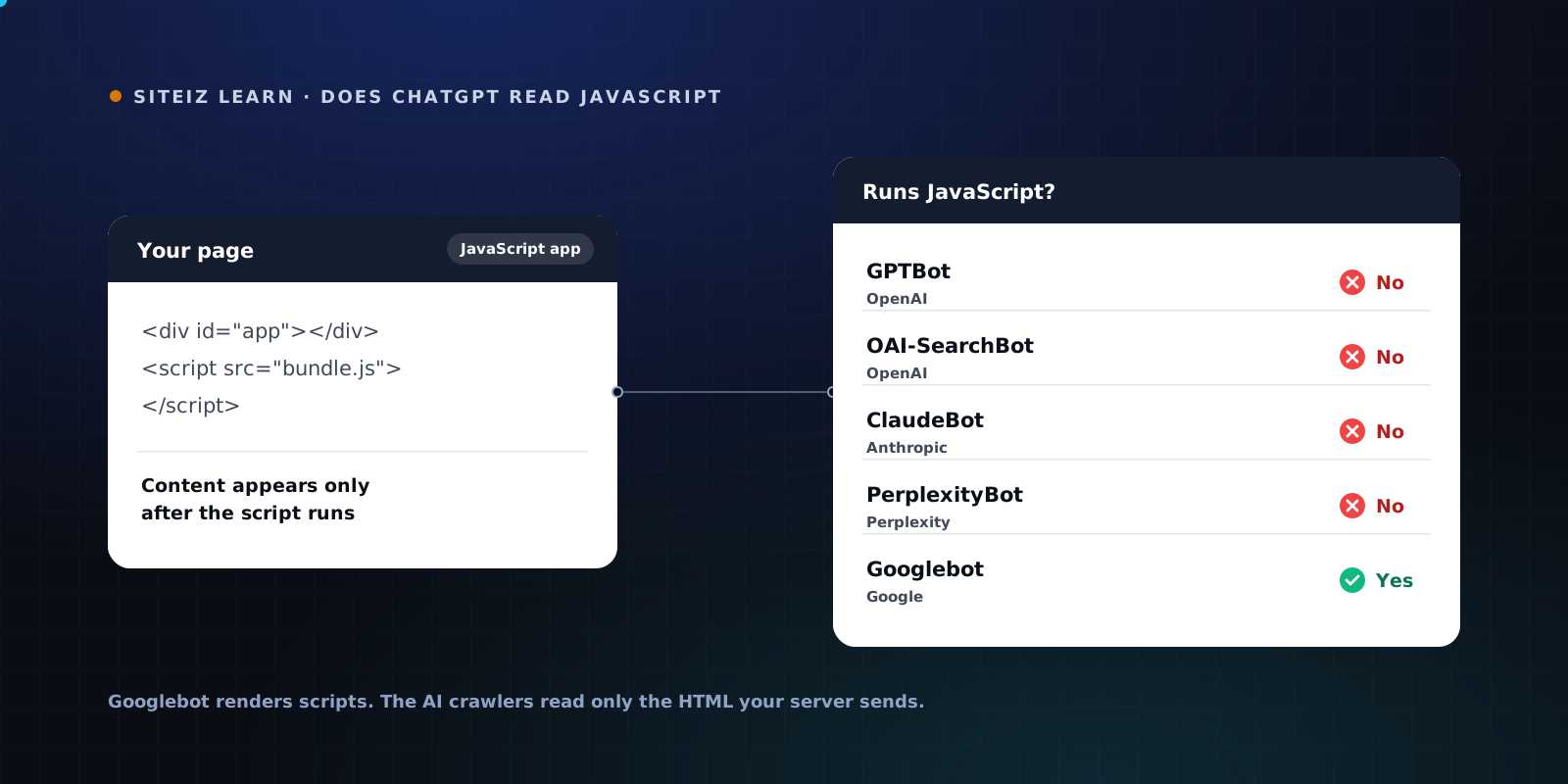
Googlebot works in two passes. It fetches your HTML, queues the page, and later executes your JavaScript in a headless Chromium. What gets indexed is the rendered DOM.
AI crawlers make one pass. They send an HTTP request, read the response body, extract the text, and leave. There is no render queue and no second visit. An analysis of about 500 million GPTBot requests, as of mid-2026, found zero JavaScript execution.
| Googlebot | GPTBot, ClaudeBot, PerplexityBot | |
|---|---|---|
| Executes JavaScript | Yes, headless Chromium | No |
| Passes over a page | Two: fetch, then render | One: fetch |
| What gets indexed | The rendered DOM | The response body |
| Client-side content | Usually recovered | Never seen |
| Lazy-loaded sections | Usually recovered | Never seen |
That last column is the audit target. If the text is not in the response body, it does not exist to AI search.
Know which agents you are auditing for
Nine tokens matter, and they do different jobs. Confusing them is why audits come back clean while the problem is live.
| Token | Sent by | Job |
|---|---|---|
| GPTBot | OpenAI | Crawls content for model training |
| OAI-SearchBot | OpenAI | Indexes pages for ChatGPT search |
| ChatGPT-User | OpenAI | Fetches a page live while answering |
| ClaudeBot | Anthropic | Crawls content for model training |
| Claude-SearchBot | Anthropic | Indexes pages for Claude search |
| Claude-User | Anthropic | Fetches a page live while answering |
| PerplexityBot | Perplexity | Indexes pages for Perplexity results |
| Perplexity-User | Perplexity | Fetches a page live while answering |
| Google-Extended | Not a crawler, see below |
Two details that change how you read your logs.
Google-Extended sends no requests. It has no user agent string. It is a robots.txt token that controls whether content Google already crawled may be used for Gemini training and grounding, and blocking it has no effect on Google Search. There is nothing to test against, so leave it out of your fetch checks.
The user agents ending in -User fetch on demand, when a person asks a question that names you. Perplexity states that Perplexity-User generally disregards robots.txt, on the grounds that a human requested the page. So a robots.txt block can remove you from an index while live fetches still succeed, which produces the confusing pattern where the engine knows you when asked directly and never volunteers you otherwise.
The seven checks
Run all seven on one page first: whichever page earns the most money.
1. Does robots.txt let them in?
curl -s https://your-site.com/robots.txt
Read every block, not just the AI ones. A User-agent: * with a broad Disallow applies to crawlers that have no rule of their own. Then look for the tokens above by name. The common failure is not a decision anyone remembers making. It is a security plugin, a CDN preset, or a "block AI scrapers" toggle someone enabled last year.
Fail: any of the nine tokens disallowed on paths you want quoted.
2. Does your server actually answer them?
curl -s -o /dev/null -w "%{http_code}\n" -A "GPTBot/1.4" https://your-site.com/page
curl -s -o /dev/null -w "%{http_code}\n" -A "Mozilla/5.0" https://your-site.com/page
Two different numbers is the finding. A 403, 429, or 503 for the bot user agent and a 200 for the browser means your WAF, CDN, or bot-management rule is doing the blocking, and robots.txt looked clean the whole time. This is the most commonly missed failure in the whole audit, because it is invisible from inside a browser.
Fail: the bot user agent gets anything other than 200.
3. Is your content in the raw bytes?
curl -s -A "GPTBot/1.4" https://your-site.com/page > raw.html
grep -ic "a distinctive phrase from your page" raw.html
Zero means the crawler never received that sentence. Repeat for a price, a product name, a specification, and your main call to action. Prices and specs are what buyers ask about, so test those specifically rather than the hero headline.
For a rough size of the gap, compare the text in the raw HTML against what you see on screen:
sed -e 's/<[^>]*>//g' raw.html | tr -s ' \n' ' \n' | wc -w
A page that reads as 900 words in a browser and returns 120 here is leaking most of itself. We measure this gap page by page, and the scan methodology is public if you want the exact comparison we run.
Fail: key facts absent, or raw word count far below what the page displays.
4. Is it the real page, or a wall?
Open raw.html and read the first 40 lines. Check the <title> element specifically.
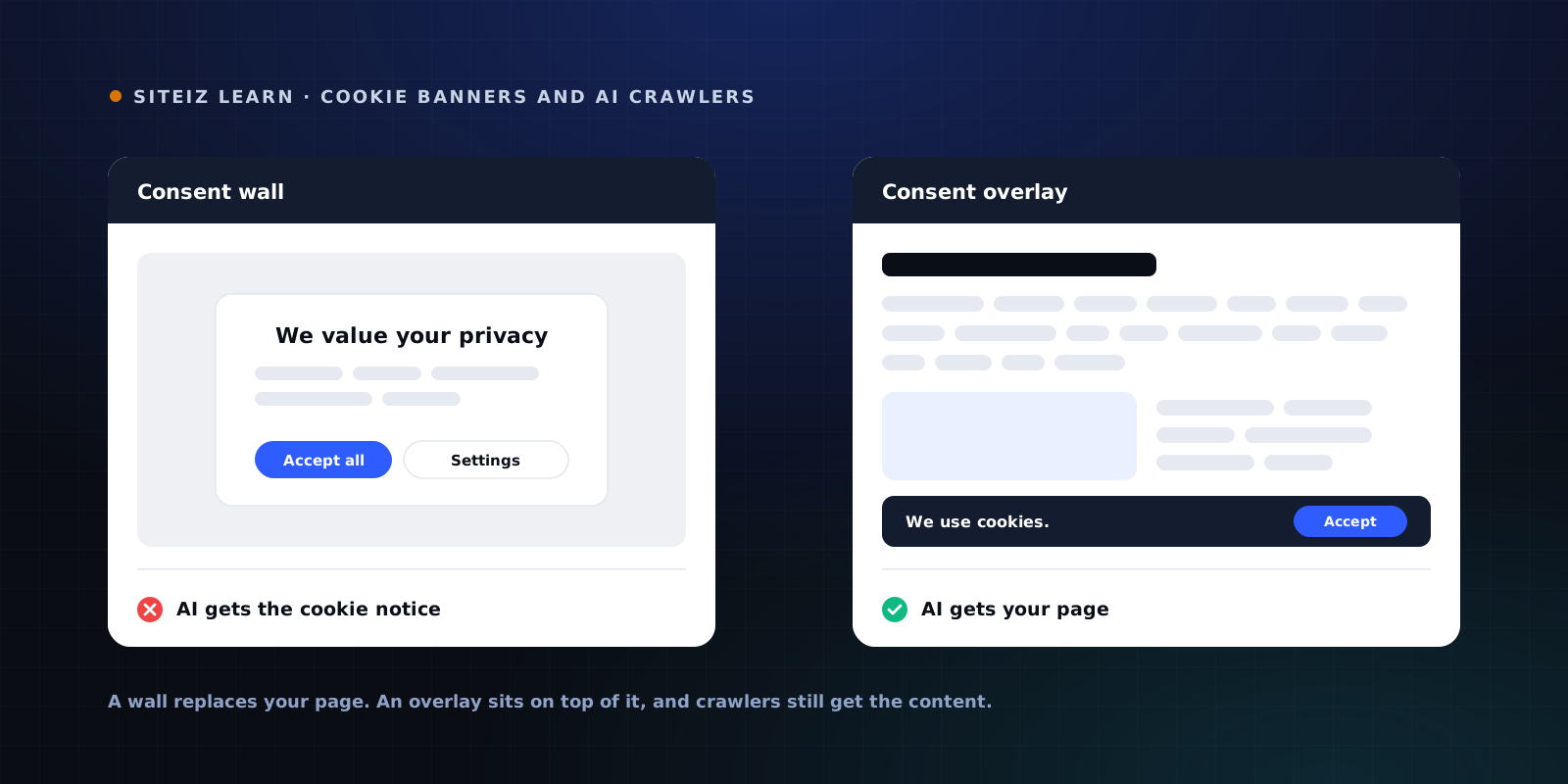
If the title says "Cookie settings", "Just a moment", "Access denied", or a country picker, that string is what the engine associates with your URL. A consent wall that hides content until someone clicks accept hands the crawler the notice instead of the page, because crawlers do not click. The same applies to age gates, geo redirects, and interstitials. We covered the mechanics in do cookie banners block AI crawlers.
Fail: the raw title or first screen of HTML is anything but your page.
5. Are your facts machine-readable?
grep -c "application/ld+json" raw.html
Zero is a fail. So is a non-zero count that contains only breadcrumbs. Check that the JSON-LD carries the facts you want quoted: product name, price, currency, availability, organization details, author, published date.
One trap worth its own line. Structured data injected through Google Tag Manager runs as JavaScript, so it exists for Googlebot and not for any AI crawler. If your schema arrives via a tag manager, grep returns zero and your audit just told you why AI engines quote the wrong price.
Fail: no JSON-LD in the raw HTML, or schema that is injected client-side.
6. Can a passage be quoted on its own?
This one is read, not run. Take your main page and find a single self-contained sentence that answers the question a buyer would type. It has to make sense with nothing around it, because that is how it will be lifted.
Pages that get cited put the answer in the first sentence under a heading shaped like a question. Pages that do not get cited bury the answer in the fourth paragraph, or put it in an image, or split it across a comparison table with no text summary.
Fail: no paragraph survives being read alone.
7. What does it cost to read you?
Compare the size of the response body against the amount of real content in it:
wc -c raw.html
A 400 KB HTML file carrying 700 words of content is mostly markup. Inline styles, giant script blocks, and repeated navigation push your actual answer far down the document. Retrieval systems work in chunks, and boilerplate crowds out the chunk you wanted.
Fail: content is a small fraction of the bytes, or your answer starts after several screens of navigation.
Auditing for ChatGPT and Perplexity specifically
The two engines fail differently, so read your results differently.
ChatGPT draws on three sources: training data from GPTBot, a search index built by OAI-SearchBot, and live fetches by ChatGPT-User. A block on GPTBot alone leaves you out of model knowledge while search and live retrieval still work. That produces an engine that finds you when it searches and never mentions you unprompted.
Perplexity leans harder on retrieval. PerplexityBot builds the index, Perplexity-User fetches live, and the live agent generally ignores robots.txt. So a robots.txt block costs you index presence, while a firewall block at check 2 costs you both. If Perplexity cannot see you at all, look at check 2 before check 1.
Then audit the answer side, which is the outcome the crawl checks explain. Ask each engine the three questions your buyers actually ask, in a fresh session with no history. Record whether you appear, which competitors do, and whether the facts about you are current. Repeat monthly with the same wording. A wrong price in an answer traces back to check 5. A missing brand traces back to checks 1 through 3.
What to fix first
Order matters, and most teams get it backwards by starting with schema.
- Access. Checks 1 and 2. Nothing else you do reaches a crawler that receives a 403.
- Content in the response body. Checks 3 and 4. Server-render the pages that carry your commercial facts.
- Structured facts. Check 5. JSON-LD in the HTML, not through a tag manager.
- Quotability and weight. Checks 6 and 7. Answer first, then the detail.
The reason to work in that order is that the traffic at stake is unusually valuable. Visitors arriving from an AI answer convert at roughly 14 to 17 percent, against about 1.8 percent for classic organic search, as of mid-2026. The engine pre-qualified them. A 403 on your pricing page hands that visitor to whichever competitor the crawler could read.
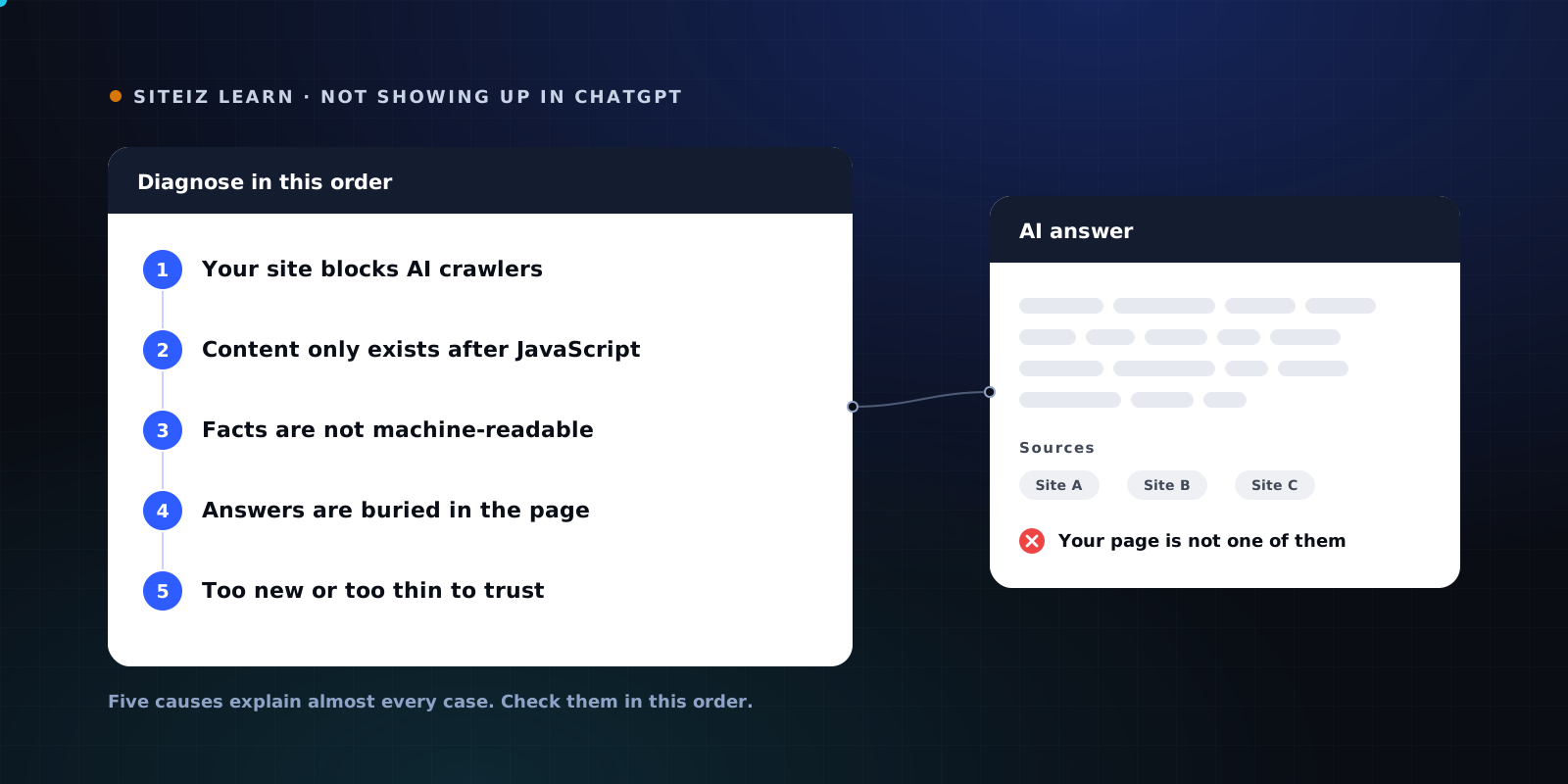
If your page passes all seven and you still do not appear, the failure is further up the funnel, and the five causes are worth reading in order.
Run the seven checks on one page and you will know where you stand. Run them on your whole site with the free Siteiz scan.
Common questions
How do I check if AI search can crawl my website?
Run three commands against your most important page. Fetch your robots.txt and confirm no AI crawler token is disallowed. Fetch the page with a GPTBot user agent and confirm the status code is 200, not 403. Then search that raw HTML for a sentence from your main content. If the sentence is missing, the crawler never received it, no matter what the page looks like in a browser.
How do I audit my site for ChatGPT and Perplexity?
Audit the fetch, then audit the answer. The fetch side is crawler access, raw-HTML content, structured facts, and quotable passages. The answer side is asking each engine the three questions your buyers ask and recording whether you appear and whether the facts are correct. ChatGPT and Perplexity use different agents for indexing and for live retrieval, so a robots.txt block and a firewall block produce different symptoms.
Does GPTBot run JavaScript?
No. An analysis of about 500 million GPTBot requests, as of mid-2026, found zero JavaScript execution. GPTBot downloads the HTML your server sends and reads that. The same holds for ClaudeBot and PerplexityBot.
My site ranks well in Google. Why would AI search still miss it?
Googlebot renders JavaScript in a headless browser before indexing. AI crawlers skip that step and index the bytes your server returned. A JavaScript-built page can rank in Google and be blank to ChatGPT at the same time. Ranking is not evidence of AI visibility.
Is Google-Extended an AI crawler I should test?
No. Google-Extended sends no requests of its own. It is a robots.txt token that controls whether content already crawled by Google may be used for Gemini training and grounding. Blocking it does not affect Google Search rankings, and there is no user agent to test against.